Clearfy Safe – Free WordPress Optimization Plugin

Clearfy Safe – Free WordPress Optimization Plugin
WordPress Plugins
Version1.0.3
WordPress5.2 – 7.0+
LicenseGPLv2
Price Free
Download Free

3 downloads

A free, lightweight alternative to Clearfy Pro, built by Ukrainian developers. The plugin has passed an official security audit by the WordPress.org team and is available at: https://wordpress.org/plugins/clearfy-safe.

Most optimization plugins are either paid or try to do everything at once and break your site. Clearfy Safe works differently: every option is independent, disabled by default where compatibility could be affected, and never touches what it shouldn’t. Tested with Elementor, Divi, WooCommerce, Astra, GeneratePress, Yoast SEO and WPML.

URL Transliteration from Cyrillic to Latin

Clearfy Safe - free WordPress optimization plugin

One of the main reasons Ukrainian and Russian-language WordPress sites have indexing issues is Cyrillic URLs. Google indexes them in encoded form: instead of /about-us/, the address bar and links show something like /%D0%BF%D1%80%D0%BE-%D0%BD%D0%B0%D1%81/. It’s not a critical error, but Latin URLs look cleaner, share better, and are easier to read.

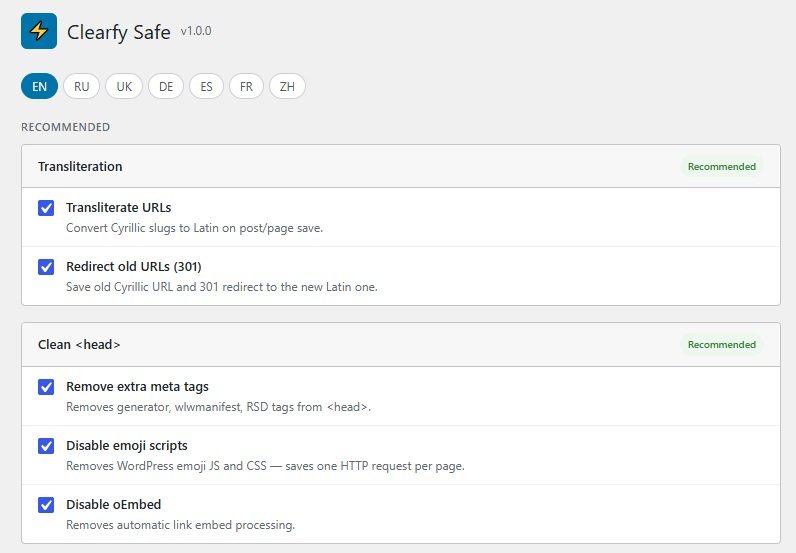
Clearfy Safe automatically transliterates page and post slugs to Latin on save. Both Ukrainian and Russian alphabets are supported. If your site already has Cyrillic URLs, the 301 redirect option will automatically forward old Cyrillic addresses to the new Latin ones — no loss of rankings, no manual link editing required.

Transliteration activates immediately after the plugin is enabled and requires no additional configuration.

Cleaning the <head> from Unnecessary Code

WordPress adds several tags to the <head> of every page that most sites don’t need:

  • generator — a meta tag exposing your WordPress version. This is a direct hint to bots about which CMS version you’re running, making it easier to find known vulnerabilities.
  • wlwmanifest and RSD — links for Windows Live Writer and other outdated publishing clients. If you don’t use these tools, these tags just clutter your code.
  • oEmbed — discovery links for embed detection. Only needed if someone embeds your content on another site via the oEmbed standard.
  • Emoji scripts — WordPress loads a separate JS and CSS file just for emoji support in old browsers. That’s one extra HTTP request on every page.

Clearfy Safe removes all of this in one click. The code gets cleaner, the page loads faster with one fewer request, and your WordPress version is no longer visible in the source code.

Performance Optimization

Clearfy Safe - free WordPress optimization plugin

Reducing Heartbeat API Frequency

WordPress Heartbeat is a mechanism that sends an AJAX request to the server every 15 seconds. It’s used for autosave in the editor and for post locking when multiple users edit simultaneously. On busy servers or with many concurrent admin users, these requests create constant load.

Clearfy Safe reduces the Heartbeat frequency from 15 to 60 seconds. Autosave keeps working, but server load drops by four times.

HTML Minification

The plugin strips extra whitespace and line breaks from the HTML output before it’s sent to the browser. This reduces the size of the HTML document and slightly speeds up data transfer. One important detail: only HTML is minified — JS and CSS files are not touched. This eliminates conflicts with themes and plugins that can be sensitive to aggressive minification.

Lazy Loading Images

The loading="lazy" attribute is automatically added to all images on the site. The browser loads only the images visible in the viewport, while the rest load as the user scrolls. This speeds up the initial page load and reduces the amount of data the browser downloads on first visit.

Basic WordPress Security

Clearfy Safe - free WordPress optimization plugin

Hiding the WordPress Version

The WordPress version is displayed by default in the page source — in the generator meta tag and as a ?ver= parameter appended to script and stylesheet URLs. Attackers use this information to target sites running versions with known vulnerabilities.

Clearfy Safe removes the version from the HTML output and from all script and style URLs. The version remains visible in the admin dashboard but disappears from public-facing code.

Disabling Author Archive Pages

WordPress creates an archive page at /author/username/ for every user by default. The name in the URL is usually the admin login. An attacker can try common addresses like /author/admin/ or /author/administrator/ to discover login credentials for a brute-force attack.

Clearfy Safe returns a 403 on such requests and blocks redirects via the ?author= parameter. Admin usernames can no longer be guessed through public URLs.

Generic Login Error Messages

By default, WordPress shows different messages for an incorrect username versus an incorrect password. This allows anyone to check whether an account with a given name exists. Clearfy Safe replaces all login error messages with a neutral one: “Incorrect username or password” — regardless of the cause.

Additional Options

Editor and Widgets

If you use Elementor, Divi, or WPBakery and don’t want Gutenberg getting in the way — you can fully disable the block editor and switch to Classic Editor. The option is safe for all popular page builders.

You can also remove default WordPress widgets from the widget panel — Archives, Recent Posts, Tag Cloud, etc. — that are rarely used but clutter the list.

Update Control

Allows selective control over automatic updates: separately for WordPress core, plugins, and themes. You can keep auto-updates only for translations (the safest option) and disable everything else, or the other way around — enable auto-updates only for core.

Disable Comments

Completely disables comments across the entire site for all post types. Useful for corporate sites, landing pages, and portfolios where comments aren’t needed but spam keeps coming in.

SEO and Junk Code in WordPress

Google uses page load speed as a ranking signal. But beyond speed, there’s another less obvious factor — the quality of the HTML code the search bot receives.

When Googlebot visits a page, it scans the entire <head>. Extra tags aren’t a direct ranking penalty, but they increase document size, slow down rendering, and — most importantly — distract the bot from the content that matters.

Here’s what specifically applies to our plugin:

Generator meta tag. Doesn’t directly affect rankings, but exposes your stack. Better to remove it.

Emoji scripts. The file wp-emoji-release.min.js is loaded on every page and blocks rendering until it finishes downloading. This directly affects Time to First Byte and Largest Contentful Paint — Core Web Vitals metrics that Google uses for ranking. Remove it and the page starts rendering faster.

oEmbed and wlwmanifest. Extra <link> tags in the head. They increase document size. Not needed — remove them.

Lazy loading images. Directly affects Largest Contentful Paint: the browser doesn’t load below-the-fold images on first visit, so the main content appears faster. Google PageSpeed Insights and Lighthouse recommend lazy loading as a required practice.

HTML minification. Reduces the size of the server’s HTML response. On content-heavy pages the difference can be 10–20% of the document size. Smaller document — faster load — better Core Web Vitals.

Hidden author URLs. Not a direct SEO factor, but duplicate content (author archives with the same content as the main site) can dilute page authority. Disabling /author/ removes these duplicates from the index.

All of these are small improvements, but together they produce cleaner code, faster Core Web Vitals, and less noise in Google’s index.

Install the plugin for free from the official WordPress directory: Clearfy Safe on WordPress.org.

Д

Leave a Comment